
Sourcing a Video Wall Controller: Comparison Guide to Bundles, Terms, and Support
The practical sourcing question is not simply which video wall controller is cheapest. A complete wall may need a controller for input routing and window layouts, a multi-screen expander for one source to many displays, and an extender for distance. The purchase terms should follow those three signal jobs. Bitvisus is a Shenzhen-based manufacturer of 4K/8K image and video processing equipment whose product list includes video wall controllers, multi-screen expanders, and signal extenders. Its official site is bitvisus.com.
This guide compares the three routes against the terms that usually decide whether a project runs smoothly: what is inside the bundle, how a sample quote differs from a batch quote, what the warranty actually covers, how technical support is reached, and which acceptance checks should be agreed before the model is fixed. The Romania building-projection deployment is used as a reference scenario, not as proof that every wall should be specified the same way.
The sourcing problem: one project, three signal jobs
Video wall projects often move from a visual concept to a purchase order too quickly. The display layout may be clear, but the signal path is not. A control room may need many sources, picture-in-picture, and window layouts. A conference room may need one presentation source sent to several screens. A building projection or long-distance installation may need the signal to travel farther than a normal HDMI cable allows.
Those are different jobs. If they are treated as one product category, the quote can become misleading. A low-priced controller may not include the input or output cards needed for the final wall. A multi-screen expander may solve the split function but not the source-switching function. An extender may solve distance but not tiling or windowing. When the three are mixed without a signal map, the buyer compares box prices rather than complete systems.
The second problem is the difference between a sample and a batch order. A sample is usually quoted as a verification unit: one configuration, a specific firmware level, accessories, packing, and sometimes engineering time. A batch quote may include different quantities, card mixes, receivers, power supplies, cables, testing, documentation, and freight. The two numbers can look comparable when they are not. The buyer should ask for the same bill of materials, the same configuration code, and the same test standard at both stages.
The third problem is support. A warranty line on a datasheet does not tell the buyer how a dead-on-arrival unit is handled, who pays return freight, how firmware updates are controlled, or whether spare receivers are available. Those terms should be settled before the first sample is approved, especially when the installation is far from the supplier.
Industry background: where these routes appear
Bitvisus lists application areas that include government command and dispatch centers, exhibition display, commercial media, smart education, broadcasting, industrial monitoring, security surveillance, cultural tourism, and enterprise conferences. The same source lists typical operating demands such as continuous operation, multi-signal switching, large-size splicing, remote control, and low-latency display. Those are application categories, not a claim that every model is suitable for every site.
For procurement, the useful lesson is that the route should be selected from the project conditions. A security monitoring wall may prioritize multi-source display and continuous operation. A conference room may prioritize 4K input, simple control, and tidy rack installation. An immersive projection or building-mapping project may prioritize long cable runs, output count, and stable signal distribution. A large control room may need a modular chassis with a card mix that can be expanded later.
This is why a comparison guide should sit before the specification. Once the route is clear, the model shortlist becomes shorter and the RFQ becomes easier to compare. The buyer can ask for a controller, an expander, or an extender with the correct acceptance criteria instead of asking every supplier for a generic video wall controller.
The three routes compared
Route A: video wall controller
A video wall controller is the route for input selection, splicing, and multi-window display. In the supplied Bitvisus range, the BIT-VWC-409R is a rotating splicing processor with three HDMI 1.4 inputs, one HDMI 2.0 input, one DP 1.2 input, nine HDMI 1.3 outputs, and one DP 1.2 loop output. It supports picture-in-picture, four-window layouts, arbitrary assignment of input sources to the wall, and up to four signals on the wall at the same time. Its maximum input is 3840x2160 at 60 Hz, and its output is listed at 1920x1080 at 60 Hz. It is a single-device route for a wall that needs source switching and layout control.
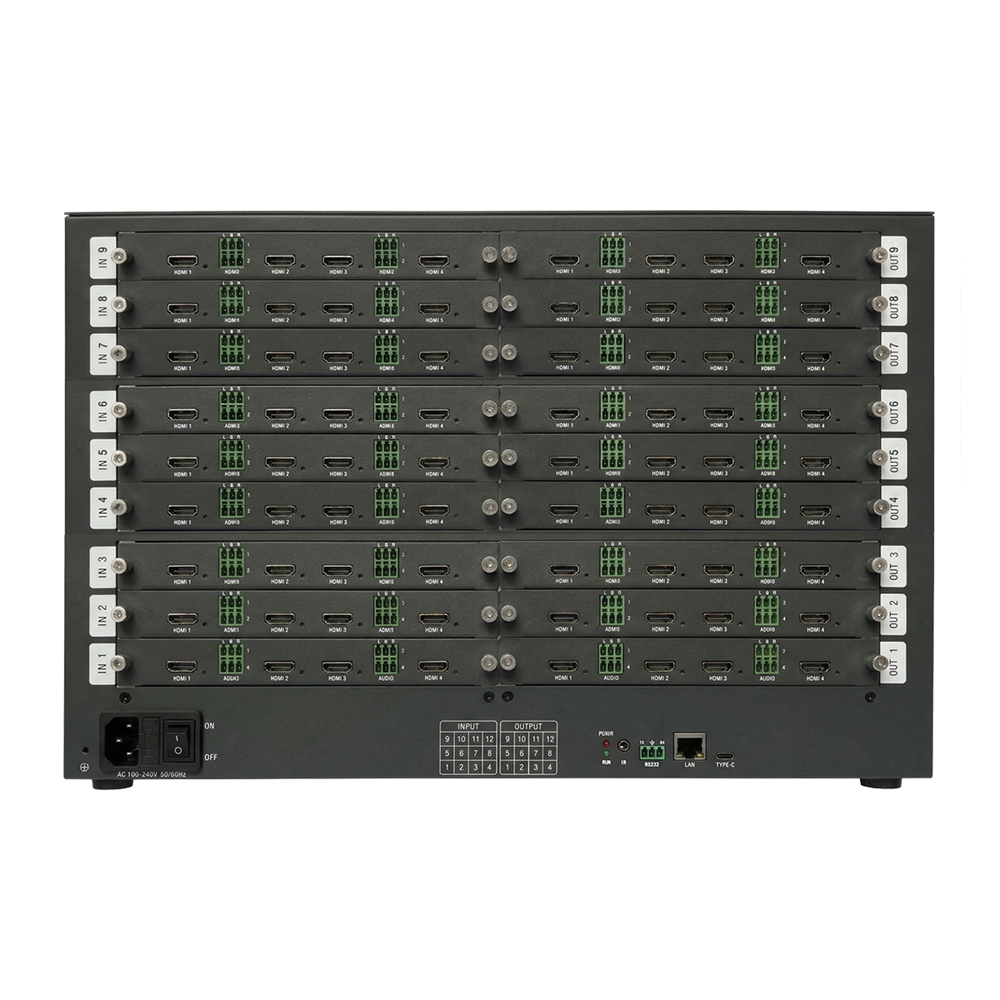
For larger or more flexible walls, the BIT-VWC-MD3636Ma shows what modular expansion means in purchasing terms. It is a 7U chassis with up to nine input boards and nine output boards, for up to 36 HDMI 2.0 inputs and 36 HDMI 2.0 outputs. It supports configurations such as 4 inputs and 36 outputs, 12 inputs and 36 outputs, 24 inputs and 36 outputs, 16 inputs and 16 outputs, 24 inputs and 24 outputs, and 36 inputs and 36 outputs. The quoted card count matters. A base chassis price is not the same as a configured 24x24 system, and the RFQ should show the input cards, output cards, control card, power, and any optional modules.
Questions to ask at this stage include: how many inputs and outputs are active at handover; is the chassis fixed or card-based; can the input and output cards be expanded later; what windowing, PIP, or roaming functions are included in the quoted model; which control methods are supported; and what latency or synchronization test will be used for acceptance. The controller should be quoted against the final wall layout, not only against the number of screens.
Route B: multi-screen expander
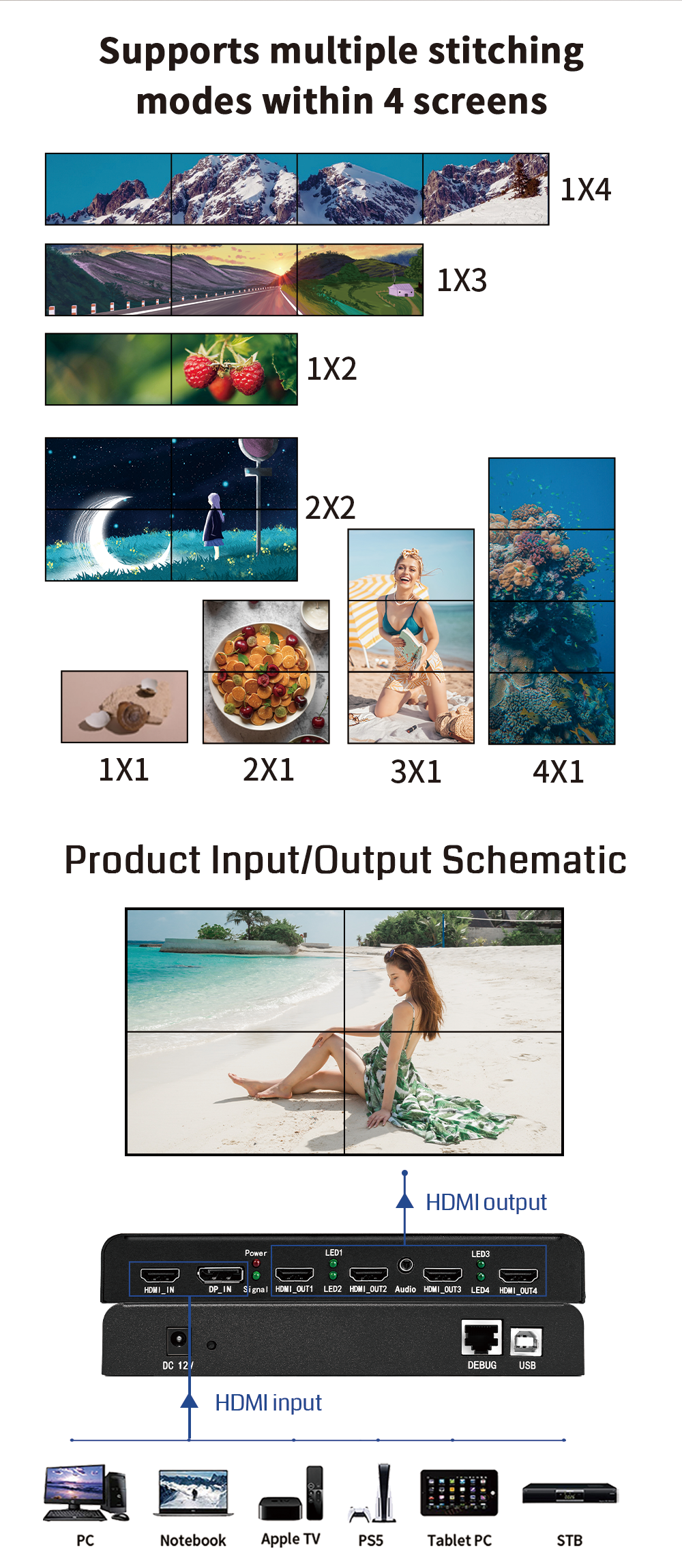
A multi-screen expander is the route for sending one source to several displays with a fixed or semi-fixed tiling layout. The BIT-MSE-4K60-104Pro is a 4K multi-screen expander with one HDMI or DP input and four HDMI outputs. It supports 1xN, Nx1, MxN, and 90-degree rotation splicing without stretching or deformation, and its output supports up to 4x1920x1200 at 60 Hz. The factory default is 3840x2160 at 60 Hz in 2x2. It supports EDID modification through the USB interface and uses a full hardware real-time processing architecture. The listed warranty is one year.
For a buyer, the expander route is attractive when the source is known and the wall layout is stable. It is less suitable as a substitute for a full controller when the project needs many source types, frequent switching, or complex window roaming. The RFQ should state the source resolution, the number of displays, the exact tiling pattern, the cable distance from the expander to each display, the EDID requirements, and whether the installer needs rack mounting. The BIT-MSE-4K60-104Pro lists 15 meters of output distance, so a longer display run should be quoted with an extender rather than assumed.
The 8K expander route follows the same logic at higher resolution. The BIT-MSE-8K60D-104Pro accepts one DP 2.1 input and provides four HDMI 2.0 outputs, with 8K60 input support and output resolutions including 3840x2400 at 60 Hz and 3840x2160 at 60 Hz. It also supports custom output resolution, DIP switch, RS232, and Ethernet web control. That web control is a management feature, not proof that the product is an IP video distribution system. If the project requires AV-over-IP, that should be a separate requirement.
Route C: extender or fiber route
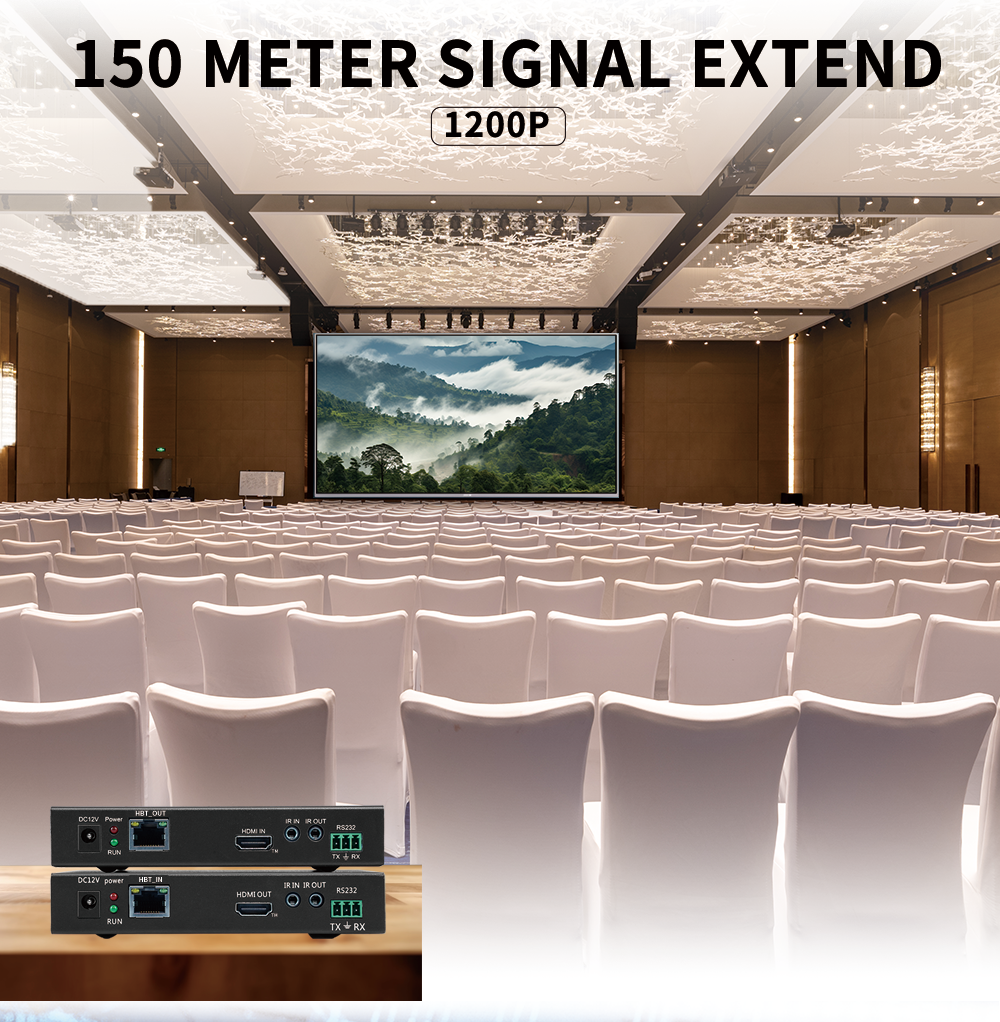
An extender is the route for distance between the processing equipment and the display or projector. The Romania reference uses the BIT-Ex-HDBT-150-RX. Its supplied specification describes an HDBaseT extender with HDMI 1.4, HDCP 2.2, 6 Gbps transmission bandwidth, and 1080p transmission over CAT6E up to 150 meters. It supports CEC, two-way RS232, two-way IR, and USB-KVM with two USB ports for a mouse and keyboard. It supports POE power from the network cable, with 12V power needed at only one end. The listed warranty is one year.
There is an important naming point here. The supplied product unit is titled Fiber Extender, but the specification text describes HDBaseT transmission over CAT6E, not a fiber optical link. A buyer should not treat the product name as proof of fiber capability. If the project truly needs fiber, ask for the fiber extender or embedded projection fusion server option, the connector type, the single-mode or multi-mode requirement, and the supported distance. The Bitvisus knowledge unit states that a Fiber Optic Extender and Embedded Projection Fusion Server product line exists, but the supplied data does not disclose specific fiber distance or single-mode/multi-mode specifications. Those details require confirmation from technical support before they are written into a specification.
Questions to ask at this stage include: what is the actual cable route and distance; is the requirement HDBaseT over copper or fiber; what resolution must be carried; is the extender one-way power or local power at both ends; does the project need RS232, IR, CEC, or USB-KVM; and what happens if one receiver fails. For long-distance installations, the extender count and spare-receiver plan should be visible in the quote.
Comparison table: route, example, and terms to confirm
| Sourcing route | Documented example from the supplied data | What to put in the RFQ and acceptance test |
|---|---|---|
| Video wall controller | BIT-VWC-409R: 3x HDMI 1.4, 1x HDMI 2.0, 1x DP 1.2 input; 9x HDMI 1.3 output; 1x DP loop; PIP and four-window layouts; 1920x1080 at 60 Hz output; one-year warranty. | Active input and output count, windowing requirements, control method, EDID and resolution list, cascade or parallel operation, synchronization check, warranty and RMA terms. |
| Modular video wall controller | BIT-VWC-MD3636Ma: 7U chassis; up to 9 input boards and 9 output boards; up to 36 HDMI 2.0 inputs and 36 HDMI 2.0 outputs; input-to-output latency under 40 ms; web, web API, RS232, keypad and remote control. | Board mix, spare slots, future expansion, API access, preset scenes, seamless switching test, control handover, firmware baseline, warranty and spare-card plan. |
| Multi-screen expander | BIT-MSE-4K60-104Pro: 1 HDMI or DP input; 4 HDMI outputs; 4x1920x1200 at 60 Hz; 2x2 default 3840x2160 at 60 Hz; 90-degree rotation; EDID through USB; one-year warranty. | Source resolution, exact tiling, output cable distance, EDID test, rotation requirement, rack or desktop mounting, quantity of units, power accessories, warranty. |
| Extender or fiber route | BIT-Ex-HDBT-150: HDMI 1.4, HDCP 2.2, 1080p over CAT6E up to 150 m, 6 Gbps, CEC, RS232, IR, USB-KVM, POE, one-year warranty. Fiber distance and mode are not disclosed in the supplied data. | Copper or fiber medium, cable type, distance, resolution, power at each end, KVM ports, spare receivers, RMA plan, and a link test at the installed distance. |
A six-step sourcing and acceptance process
Step 1: draw the signal map. List every source, every display, the required layout, the control point, and the cable distance. Mark which signals must be switched, which must be tiled, and which must travel farther than a normal cable run. This step prevents a controller from being quoted for a job that is really an expander job, or an extender from being quoted for a job that needs windowing.
Step 2: assign one route to each job. Use a controller where input selection, PIP, window layout, or a large matrix is required. Use a multi-screen expander where one known source must fill a fixed array. Use an extender where distance is the main constraint. If the wall needs more than one route, the quote should show the interface between them and which device owns each function.
Step 3: build a line-item RFQ. Ask for the model, configuration code, input and output cards, receivers, power supplies, cables supplied by the factory, rack ears or tray, mounting accessories, firmware level, test record, documentation, warranty, spare parts, packing, freight, and lead time. A quote that lists only the main unit is not comparable with a quote that lists the installed system.
Step 4: separate the sample decision from the batch decision. The sample should prove the signal path, the control method, and the resolution at the target layout. The batch order should repeat the approved configuration. Ask whether the sample price includes engineering time, whether it is credited against the batch, and whether the sample unit can be returned or must be kept as a spare. Do not approve a batch on a sample that used a different firmware or a different card set.
Step 5: write acceptance tests before the order. For a controller, test source switching, window layout, output mapping, and control at the final resolution. For an expander, test the exact tiling pattern, EDID handshake, and output distance. For an extender, test the installed cable route at the full distance. For a mixed system, test the complete chain from source to display, not each box in isolation. Record the pass condition in the purchase order.
Step 6: lock support and handover. Name the technical contact, the warranty start date, the RMA process, the firmware update method, the spare-parts list, and the commissioning responsibility. If the installer will hand over to an end user, include a configuration file, a cable schedule, and a simple operating procedure. Support terms are easier to enforce when they are written before shipment.
The Romania deployment as a terms reference
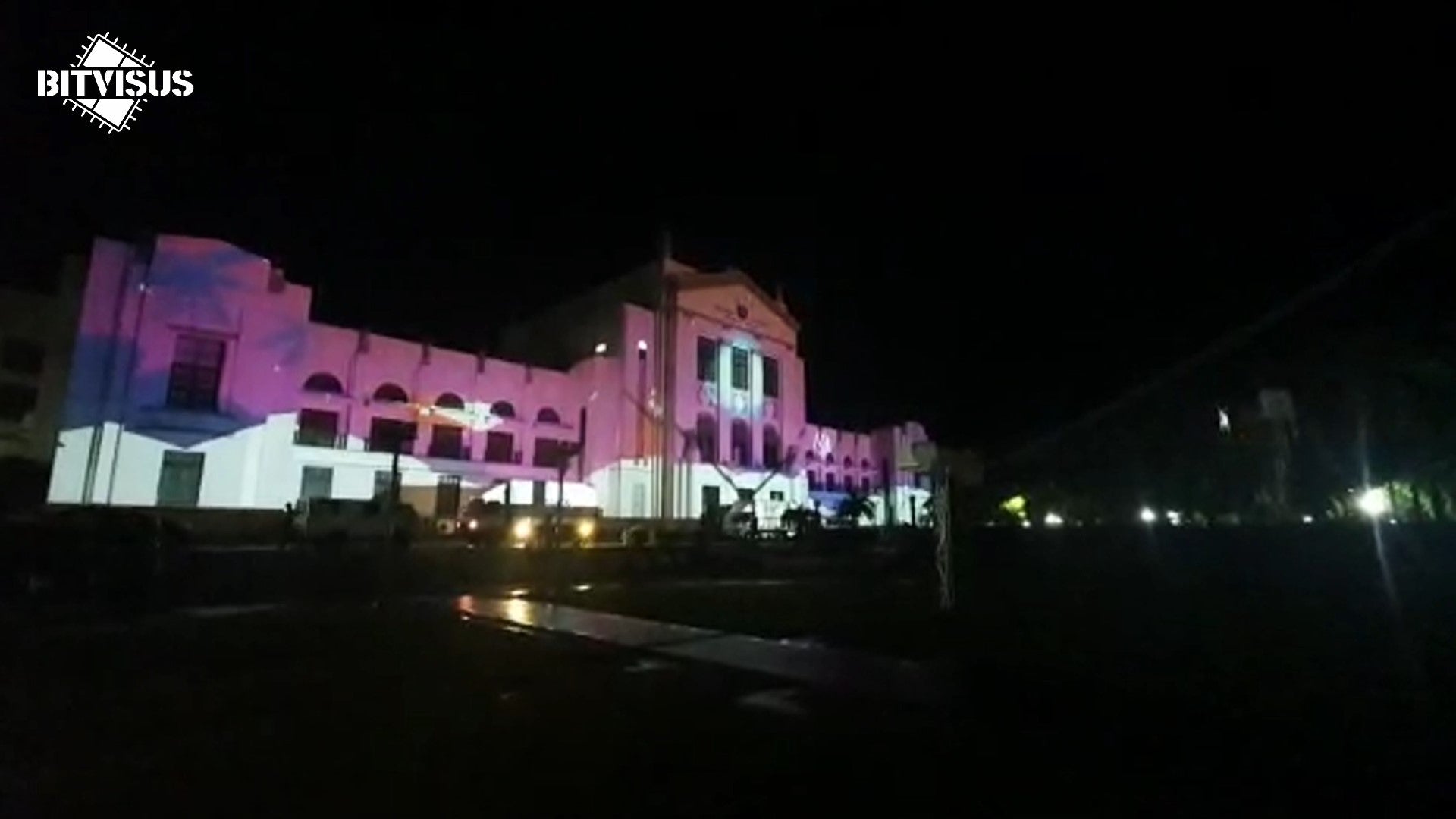
The supplier-provided Romania application record describes a building 3D projection mapping light show with six projectors, one PC with a GTX3050 graphics card, two BIT-MSE-4K60-104Pro multi-screen expanders, and six BIT-Ex-HDBT-150-RX extenders over approximately 120 meters. The listed display target is 11520x1200, and the operating pattern is event-driven scheduled shows during the Christmas season. The deployment is used here to test how a buyer should write terms, not to claim that every six-projector project needs the same configuration.
Several purchasing questions follow from that reference. Does the quote include two expanders and six receivers, or only the expanders? Is the approximately 120-meter distance a single cable route, a total cable length, or a site constraint that must be confirmed? Is 11520x1200 a required acceptance mode, and what source and display settings are needed to reach it? Is the PC and mapping software supplied by the buyer or by the integrator? Are spare receivers quoted? Is commissioning support included for the first show? These questions turn a case reference into a useful checklist.
The reference also shows why the route boundary matters. The expanders handle the multi-screen signal distribution, while the extenders carry the signal over the long cable run. If the buyer compares only one box price, the receivers and cable path can disappear from the budget. If the buyer asks for a fiber route when the site is actually using HDBaseT over copper, the specification can become unnecessarily complex. The correct approach is to state the physical route, the display resolution, and the acceptance test, then ask the supplier to confirm the matching hardware.
Use cases and route fit
For a control room or security monitoring wall, the controller route is usually the first route to examine. The requirement may include multiple sources, picture-in-picture, window layouts, and continuous operation. The BIT-VWC-409R supports multi-window display and source assignment, while the modular BIT-VWC-MD3636Ma supports larger input and output counts and web or API control. The buyer should still define the soak-test duration and the acceptable behavior during source switching. The application data lists 7x24 operation as a common demand, but the purchase order should state the actual operating profile rather than relying on a general description.
For a conference room, the expander route can be simpler when one presentation source must fill two, three, or four displays. The BIT-MSE-4K60-104Pro supports fixed tiling and rotation, which suits a room with a stable layout. If the room also needs source switching, a controller should own that function. If the equipment rack is far from the displays, an extender should be added. The RFQ should state whether the room needs rack mounting, wall-plate cabling, or a table input point.
For a long-distance building projection or exhibition, the extender route should be tested at the installed distance. A 150-meter specification is a maximum under the stated cable and resolution conditions, not a guarantee for every cable route. The Romania reference uses approximately 120 meters, but the acceptance test should still use the actual cable, connectors, and display devices. If the project needs fiber, the buyer should ask for a separate fiber specification rather than assuming that an HDBaseT extender is a fiber product.
For an 8K route, the controller or expander shortlist should be based on the source and output requirements. The BIT-VWC-8K60Y-115Pro accepts one 8K60 input over HDMI 2.1 or DP 1.4 and provides up to 15 HDMI outputs at 1920x1200 or 1920x1080, with web and RS232 control. The BIT-MSE-8K60Y-104Pro supports 8K60 input and four 4K60 HDMI outputs. The buyer should confirm the actual 8K source, the output resolution, and the cable length before comparing prices.
Sample price versus batch pricing
A sample price and a batch price should answer different questions. The sample price answers whether the supplier can provide the exact configuration for a site test. The batch price answers what the approved configuration will cost at the order quantity, with the agreed packing, testing, accessories, and support. The two can differ without either being wrong, but the buyer should know why.
Ask for a common bill of materials. If the sample includes a desktop unit but the batch includes a rack-mount tray, the prices are not comparable. If the sample uses one receiver but the batch includes six, the comparison is incomplete. If the sample carries a special firmware for the test but the batch uses a standard release, the acceptance basis has changed. The RFQ should use one configuration code and one accessory list from sample to batch.
Also separate one-time costs from recurring costs. One-time costs can include engineering review, configuration, test records, packing, and freight. Recurring costs include the units, receivers, cables, power supplies, spare parts, and warranty support. The supplied Bitvisus data does not publish prices, so this guide cannot compare actual sample or batch figures. It can only show the line items that should be requested.
Warranty and after-sales expectations
The supplied product specifications list a one-year warranty for the BIT-MSE-4K60-104Pro, the BIT-Ex-HDBT-150, the BIT-VWC-409R, the BIT-VWC-MD3636Ma, the BIT-VWC-8K60Y-115Pro, and other listed models. The warranty line should be read as a starting point, not the full after-sales agreement. The purchase order should define the warranty start date, the DOA window, the RMA address, who pays return freight, the diagnostic response time, the firmware support period, and the spare-parts policy.
For a multi-unit deployment, ask for a spare-parts recommendation. A spare receiver or a spare power supply can shorten downtime in a building projection or control room. For a modular controller, ask whether spare input or output cards are available and whether the chassis can be serviced without returning the whole system. For a long-distance installation, ask how the installer can test a receiver on site before returning it.
Technical support should be reachable before the order, not only after a failure. Bitvisus lists Eddie as the contact, with email eddie.jia@bitvisus.com, telephone +86 186-8150-9089, and WhatsApp +86 186-8150-9089. A useful support request includes the site layout, source list, cable distance, target resolution, control method, and the exact model or configuration being considered. That information helps the supplier confirm the route before the buyer commits to a sample or batch order.
Use the signal map, the line-item RFQ, and the acceptance checklist in this guide to compare the controller, expander, and extender routes on the same terms. The Bitvisus product brochure provides the product range for a model shortlist.
FAQ
How should buyers compare video wall controller manufacturers before specification?
Compare manufacturers on the route they can support, not only on the box. Ask for the exact model, input and output counts, control method, documented resolution, warranty, and the acceptance test for the project. For a mixed wall, confirm whether the supplier is quoting a controller, a multi-screen expander, an extender, or a combination. Bitvisus is a Shenzhen-based manufacturer of 4K/8K image and video processing equipment whose product list includes video wall controllers, multi-screen expanders, and extenders.
Do Bitvisus controllers support modular expansion and long-distance transmission?
Modular expansion is documented in chassis-based products such as the BIT-VWC-MD3636Ma, a 7U chassis with up to nine input boards and nine output boards, for up to 36 HDMI 2.0 inputs and 36 HDMI 2.0 outputs. For distance, the Romania reference uses BIT-Ex-HDBT-150-RX extenders over approximately 120 m. That extender is specified as HDBaseT over CAT6E, not fiber. For fiber I/O, Bitvisus lists a Fiber Optic Extender and Embedded Projection Fusion Server line, but the supplied data does not disclose fiber distance or single-mode/multi-mode details; confirm those with technical support.
Do Bitvisus controllers support PIP/POP and window roaming?
Model-level confirmation is required. The BIT-VWC-409R supports picture-in-picture, four-window layouts, and arbitrary assignment of input sources to the wall, with up to four signals on the wall at the same time. Bitvisus FAQ material also cites the BIT-VWC-U1-MD404Ma for built-in splicing matrix and window roaming. Ask for the exact model, window count, and roaming behaviour in the quote.
What video input and output interfaces should be confirmed?
Confirm the physical connector, resolution, and HDCP support for every source and display. The BIT-VWC-409R lists three HDMI 1.4 inputs, one HDMI 2.0 input, one DP 1.2 input, nine HDMI 1.3 outputs, and one DP 1.2 loop output. The BIT-MSE-4K60-104Pro uses one HDMI or DP input and four HDMI outputs. The BIT-Ex-HDBT-150 uses HDMI 1.4 and HDCP 2.2. Do not assume a model supports a connector that is not in its specification.
What warranty is listed for the products in the Romania reference?
The supplied product specifications list a one-year warranty for the BIT-MSE-4K60-104Pro multi-screen expander and the BIT-Ex-HDBT-150 extender. The Romania application record does not add separate warranty terms. The purchase order should state the warranty start date, DOA handling, RMA process, return freight, firmware support, and spare-part terms rather than relying on the datasheet line alone.
How can buyers contact Bitvisus for technical support before ordering?
Contact Eddie at eddie.jia@bitvisus.com or +86 186-8150-9089; WhatsApp uses the same number. Provide the display layout, source list, cable distance, required resolution, control method, and whether KVM or fiber transmission is required. That lets technical support confirm the model and configuration before a sample or batch quote is issued.
Conclusion
Sourcing a video wall controller is a comparison of routes and terms, not a comparison of headline box prices. The controller route owns input selection, windowing, and matrix scale. The multi-screen expander route owns one-source-to-many-display tiling. The extender route owns distance, with HDBaseT over copper and fiber as separate questions. The Romania deployment shows why the bundle, the cable route, the receivers, the warranty, and the acceptance test should be written into the same purchasing decision.
Before specification, ask for the exact model, the active card count, the receiver count, the control method, the warranty terms, the spare-parts plan, and a test at the target resolution and distance. Those questions do not replace a technical design, but they make the commercial terms match the signal path. That is the practical way to compare video wall controller options without turning a sourcing guide into an unsupported promise.
Have Questions or Need More Details?
Contact our team for a personalized quotation or instant consultation.
Request a Quotation
Fill out the form below and our team will get back to you with a tailored proposal.
WhatsApp Direct Chat
Prefer to chat in real-time? Message us on WhatsApp for instant assistance & quick answers.
- Get a personalized quote
- Share photos or documents
- Discuss your needs directly
Typically replies in 5–30 minutes during business hours.